Creating Black and White Graphics in Microsoft Paint
Whether you’re interested in creating a custom gift, playing an office prank, or creating a stamp with a company logo, a monochrome file will be needed.
Here’s a (completely hypothetical!) scenario: A good friend has a certain affection for British actor Cillian Murphy, perhaps best known for his role as “the scarecrow” in the movie Batman Begins. After much searching and contemplating of the perfect gift, you find this exquisitely incriminating photo of her:

Perfect! Now, how are we going to make it into a gift?
If you would like to use a resource that is probably already at hand, most Windows operating systems come with a utility called “Paint”. Paint can usually be found by going to Start menu > Accessories > Paint. Opening a file and converting it in Paint is a fairly simple process
To open the file, choose File > Open and navigate to the file on your computer. Once the file is open, to convert this to a monochrome file, click on File > Save As and change “Save as type” to “Monochrome Bitmap”.
Here is the result:

It’s not really as clean as we would like, and it doesn’t really capture the adoration of the scarecrow. What other options can be explored with Paint? We can attempt to invert the colors and make our friend and the scarecrow the darkened images. In Paint, go to Image > Invert Colors, and the colors will automatically be reversed:
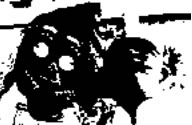
No, the inverting of the colors has not helped our cause. We’ll have to find a different solution.
** Note: When testing different graphic formats and colorings, it is best to save your work as a different filename each time, thus keeping the original graphic intact.
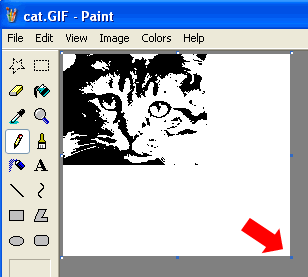
It is also relatively easy to crop images in Microsoft Paint. For example, this cat image is a perfectly converted monochrome graphic; however, there is a great deal of whitespace to the right and bottom of the important part of the image. If we click and drag the box in the lower right-hand corner (pointed at by the red arrow), we can drag the borders of this graphic until the whitespace is completely eliminated:
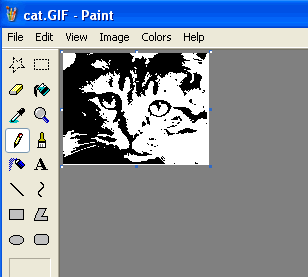
Now all of the extra whitespace has been cropped from the image, leaving us with the most important part of the graphic:
If there are no further graphic-altering applications at hand, considering downloading a freeware or trial application at Download.com. This is a safe, trusted, and legal downloading resource owned by CNET, an industry standard for technology-related reviews. I would recommend starting with Adobe® Fireworks®, which is available as a trial and works wonderfully for transforming graphics.
Ready to get started? Check our our custom self-inking stamps, personalize a signature stamp,
shop our unique return address stamp designs, or peruse our huge selection of custom stamps.
Part 2 – Using Adobe Fireworks to Create a Professional-Looking
Black and White Stamp Graphic
© RubberStamps.net. All rights reserved. This material may not be published, broadcast, rewritten or redistributed without written
permission. Feel free to link to this webpage.



Connect With Us