Creating Black and White Graphics in Adobe Fireworks
Adobe® Fireworks® is a powerful program that can be used to alter many kinds of graphic images. A free trial of Fireworks can be obtained from Adobe.
To create a black and white graphic in Adobe Fireworks, open the file. To make sure all the appropriate panels are showing, click on the Window menu (next to the Help menu) and select Tools, Properties and Optimize. Once a panel has been selected, it will create a checkmark to the left of this item. For use on RubberStamps.net we are currently able to accept .bmp, .gif, .png and .jpg; for the purpose of this example, we will create a .gif file.
We will set the Optimize settings as follows:
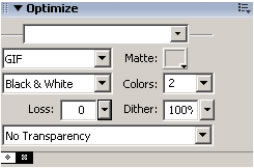
At this point, the graphic will not physically appear different (yet). After these settings have been changed, choose File > Export and choose a new file name for your .gif file and save. If you attempt to simply save the file (rather than exporting it), it will attempt to make a Fireworks .png file, and this file type will be larger in disc size than it needs to be.
Navigate to your new file and open it; you will see that it is a monochrome file!
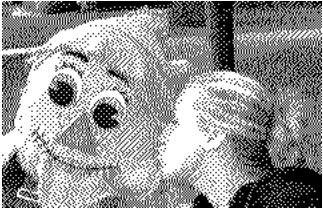
We can see the full affection for the scarecrow in this version. Now we can upload this monochrome file, add some text at the bottom, and make a custom stamp for a birthday present.
The picture below is a preview of a stamp created by personalizing a Trodat 4926 stamp on RubberStamps.net. It’s the perfect combination of embarrassing, cute and creepy.
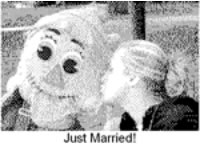
This begs the question, why the massive difference between Paint’s and Fireworks’ capabilities? Why does Paint give us an end product without all the nuances of Adobe Fireworks?
The secret is in the “dither” setting shown above. Note that the dither percentage is set to 100%. In Fireworks, increasing the dithering tells the program to approximate the colors by mixing or alternating pixels. In other words, the greater the percentage of dither, the greater amount of surrounding pixels Fireworks takes into account when determining if a particular pixel will be set to black or white. If we had set the dither percentage to 0%, we would have received a graphic identical to the one in Paint. Paint does not have the capability to dither; it merely looks at each individual pixel and approximates the color; it does not have the capability to consider surrounding pixels when determining blak or white.
Other helpful hints for converting to a monochrome format:
- – Use a graphic or photo where the background is a different color than the
main objects.
- – Make sure a shadow and/or a flash has not unnaturally altering the colors or
brightness in the photo.
- – Do not use a blurry or out of focus image.
- – Crop/cut out only the part of the image you want to submit. To do this in
Fireworks, click on your picture so that it is selected (you will see a blue border around it), and go to the menu: Edit > Crop Selected Bitmap. This will create a black, dashed line around your image. Adjust the crop handles until all that remains is the part of the image you would like to keep. Double-click inside the crop box and the rest will be removed. To fit the canvas to your newly-cropped item, go to the menu Modify > Canvas > Fit Canvas, and the canvas will fit to the cropped item. To save this cropped and fitted graphic, go to File > Export and export the file again. (Reminder: Use Export and not Save or Fireworks will attempt to save an unnecessarily large disc size .png file.)
Whether you use Microsoft® Paint or Adobe Fireworks, there are a large number of graphics programs available. Find one you are comfortable with and explore away! The alteration possibilities in these software packages are very impressive. Just look at the perfect images of models and movie stars on magazine covers. They wouldn’t look as good as they do without photo manipulation programs!
Back to Stamping Information
© 2012 RubberStamps.net. All rights reserved. This material may not be published, broadcast, rewritten or redistributed without written
permission. Feel free to link to this webpage.



Connect With Us